When I was working on my commercial I had to learn how to use capcut. I already knew how to put pictures and videos into capcut but I didn't know how to add transitions or sounds. In order to know how to do these thing I found a YouTube video explaining how to use capcut. I also learned that I can adjust the amount of time each video or picture is in the commercial for. When I put my voiceovers into the commercial I had to adjust the picture lengths to fit the voiceovers in the time that the picture was up. Because the song I wanted to use wasn't in capcut's song selection I decided to find the song on YouTube and screen record it. I then put the part of the song that I want to use in the video by selecting video sounds from my camera roll. After I put the song into the commercial I learned how to edit it so that the noise would fade in and out. I learned a lot about the process of putting a video together. The YouTube video I watched explained how to use capcut very well. ...
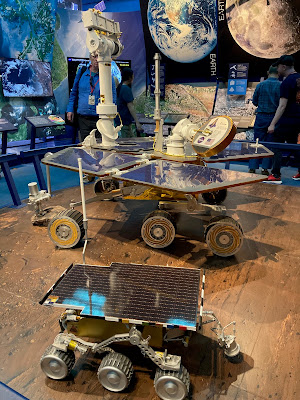
My name is Ryan. I'm 15 years old and I am a sophomore in high school. My favorite things to do are listen to music, play basketball, and read. I also like to play video games. My favorite video games are Jedi: Fallen Order, Marvel's Spider-Man (spiderman ps4), The Legend of Zelda: Breath of the Wild/Tears of the Kingdom, and Minecraft. I enjoy watching movies/tv shows with my family. A few of my favorites are Marvel and Star Wars. I like sleeping late but unfortunately I get up at 6:30 every day for school. I'm very interested in learning about space. It's so cool to think that there might be life on other planets. I think it would be really neat to go to space one day. I have been to the Air and Space Museum in Washington, D.C. several times. I like looking at the different types of spacecraft and planes in the museum. It's really cool to see how the designs and mechanics have changed over time. In July I went to NASA's Jet Propultion Laboratory. When...
Today I learned how to use capcut. I found a youtube video explaining how it works. I then used capcut to start making my commercial. The first thing I did on capcut was press the New project button. The second thing I did was name the project All About Me Commercial. Then I put the pictures and videos I chose into the project. After I put the pictures and videos into capcut, I put them into the order I chose previously. I put them in order by tapping on each picture in the order I wanted them in. Since I wanted to transition from one picture to the next, I found some transitions to put for each picture. There were 9 transitions that showed up as results from me looking up transitions in the effects tab. I decided on 5 different transitions so that each picture would have one. I had planned on to use some animation with some of the pictures but I decided to not do this. Then I started looking over my script that I made a few days ago to see what I would say for each picture. After look...

Comments
Post a Comment