Posts

CCR for Final Task

Image
Here's my CCR for my Final Task

Final Task

Image

Changes Made from Film Review Blog

Image
My friend Conner watched my movie with me in class last week. He really liked it. There were only a few things that I needed to udpate. The first thing was that I needed to update the music. When he watched it, he noticed that there was a funny sound at the start of it. We talked about how I should start the music clip a little sooner. I listened to it again before I edited and I knew exactly what to do. I removed the music clip and reloaded it. I cut it a few seconds earlier than I had previously. I did a few test runs to make sure it sounded okay. The other thing I needed to update was that one of my title screens was still the place holder instead of the real one. I had completely forgotten about it, but he caught it. So I went into PowerPoint and found my file for the slides. Then I found the one that I hadn't finished yet and updated it. Then I uploaded it back into my CapCut file and replaced the place holder with the new one. I exported a copy of the movie file to watch agai...

Film Review Blog

Image
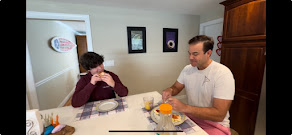
I asked my friend Conner to review by movie. I wasn't really sure what he would think, but I was excited to get his reaction. He is in my class, so we could watch it together. The first time we watched it, he laughed when my parents found out I was invisible. He thought it was funny that my dad was looking for me in the dishwasher. He also laughed when I stole my dad's breakfast.  When we got to the part where I put chocolate sauce on my brother's bagel, he asked why my hand was in the shot. I explained that I had thought about that before we shot the footage. I decided that since the movie was shot from my perspective and I didn't know that I was invisible, I would have been able to see my hand. As a result, I thought it was okay to include that shot. He agreed that that made sense. We continued watching and he laughed when I pulled the chair out from under my brother. At the end he said that he really liked it. We watched it together one more time. This time we talked...

Re-Editing Blog

Image
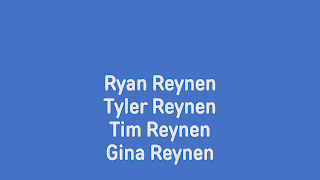
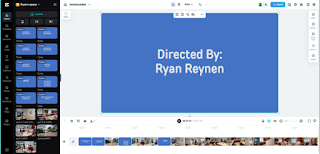
After I looked over the movie at the end of my last blog, I found some things that I wanted to change. One of these things was the title screen showing the actor's names. It looked like the picture included in this blog, but I wanted the names to be center aligned. After I changed it in the PowerPoint I made my title screens on, I used the Snipping Tool to cut out the slide and save it as a PNG file. I then uploaded the picture to CapCut, and placed the original. After this, I edited it to be in the movie for the same length of time as my other title screens.  Another thing I had to change was the Music By title screen since I didn't have anything on it. I didn't have anything on it because I wasn't sure my movie needed music, however I knew it was a requirement. So I needed to find a song and get that edited in to the movie. The song I picked was on Spotify. I used my phone to do a screen recording while I listened to the part of the song that I wanted to use. I only n...

Music Blog

Image
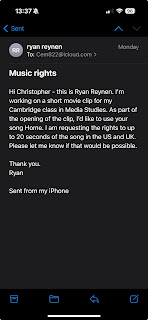
After I finished editing my final task, I thought it was good without music, but I knew I had to use music in it. I didn't feel like the words in any song I liked would work with my movie. I also really didn't want to e-mail a muscian who might never reply to me. Plus I wasn't really sure how to go about it. So I waited and waited and waited. But I knew I couldn't wait any longer.  My mom recommended that I choose a song that had a good section of instrumentals. I remembered that my dad's friend's son had just recorded a song on Spotify. I remembered that had a really good guitar part. So, I listened to it and felt that it could be a good fit.      The next step was to e-mail him and ask permission to use the song. I wanted to be sure that he understood how long of a section of music I would be using and where I would be showing it. Since I am in the US and the team of professors at Cambridge who will review it are in the UK, I asked for the rights to show it in...

Editing Blog: Finishing up

Image
So CapCut decided to delete my project. I tried logging into multiple accounts, but no matter what account I used, I couldn't find my project. I became extremely frustrated. Because of this I despise CapCut. After I cooled down, I figured out how to get my project back. I did this by just making a new project and putting the title screens and video clips in it.  After I made a new project, I started to cut down my clips. I put in the first clip and watched it. Then I cut it down because it was 30 seconds and that was too long. Plus, when I filmed it, I added extra time before and after each scene to allow for easier editing. There were a few clips that I didn't want to cut down, but I had to cut them down. The footage of my film was good, but it was way too long. If I decided not to cut anything, I would have had six and a half minutes of footage.  When I felt that I had cut out enough, I exported it and downloaded it to my computer to watch. As it turns out, I made my title s...

Editing Blog: Starting to edit

Image
When I was ready to start editing, I first created all of my title screens. I used PowerPoint to create them. I made each one a blue screen with white text like I had planned. There were 10 in all. I made sure that they were in the right order and then I saved the file. Next, I uploaded these to Canva to make them all into individual images. From there I uploaded these image files and the footage I shot earlier to CapCut. In CapCut, when I uploaded everything, it put it into one long movie file. When I tried to edit, it got super slow, and I couldn’t do anything. This was very frustrating. I tried to make it work, but it seemed nothing would speed it up. Then I removed all of the footage from the project and tried just putting in the opening scene. This worked much better. Now I could edit the scene down to just the part I wanted, and it worked much better. Then I remembered that I needed to put the title screens into the project. Using my story board for guidance, I put in the first...

Re-Shoot Blog

Image
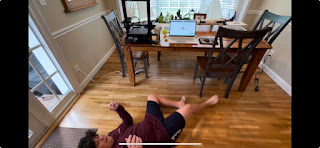
I reviewed all of the footage that I shot to see what it looks like. One of the first clips that I watched got cut off, so I knew right away that I would have to reshoot that one. The next one looked really good. I checked it again for lighting and to be sure that the lines were correct and easy to hear, and it was a keeper. The next one my dad messed up the lines. I watched it again to see if I could edit it, but I don’t think I can, so we’ll need to reshoot this one. The next scene that I reviewed was really long. I think that the lighting is good. The camera angle works, and the shots and movement are good in this one. I will need to split it up when I edit, but I think the footage is good, so I’m going to keep it. The other parts all looked good, so we only had two scenes to reshoot. I called my family together and had them all get ready for a reshoot. Since we were doing this the next day, I needed everyone to put on the clothes they were wearing the day before. I also made su...

Filming Blog: Wrapping Up

Image
After we finished the first round of filming, I reviewed all of the footage we had shot so far and the script. Since we had so much improvisation, I needed to modify the original script a little, but it wasn’t too hard. Then I called the actors back in and reviewed the changes I had made. We needed to film one more scene in the kitchen. This was the scene where I figured out that I was invisible. We started with my dad coming down the stairs and into the kitchen. I told them I was there, but no one could see me. My dad improvised some more and looked for my in the dishwasher. Then I decided to pinch him and push him across the room. Then I grabbed my mom’s arm and shook it around. And then I went over to my brother and shook his hand. My family members looked at the camera with confused looks each time. When we were done with that scene, there was only one scene left to film – the scene at the end. For this scene, my brother walked into the front room of our house to do a 3D print....

Filming Blog: Kitchen Scenes

Image
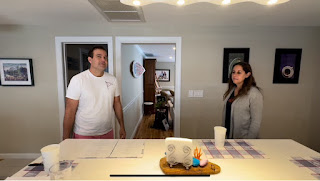
We decided to film things out of order because that’s how it would work best. In order to know what scene went where, I asked someone to hold up fingers to indicate which scene we were in. I hope that when I edit later, it will be easy to find each scene. I also planned to leave a little video at the end of each scene so that I could edit more easily. We actually started with the first scene, which was my brother and my mother talking at the kitchen counter. We had to do a few takes because I accidentally stopped it too early. Then my dad was done making his breakfast, so we switched to the scene where I take his breakfast. When my dad turned to get a glass for juice, I stole his breakfast. We got a little confused about what was supposed to happen here, so we had to stop and do a retake. This time when my dad turned back, he and my brother improvised. They did a great job arguing over what happened to my breakfast. This went on longer than I had scripted, but I really liked what the...

Preparing to Film

Image
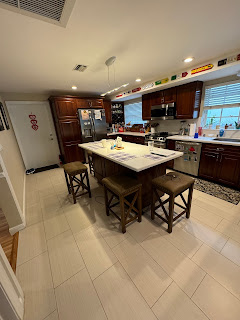
In order to get ready to film my final task, I started by printing two copies of my script. Then I marked where each scene would end on the script so that we would know when to move the camera. The next step was to clean up the kitchen in my house because that’s where most of the scenes would occur. I also prepared the table area where one of the scenes would occur. I walked around both spaces thinking about what the viewer would see to ensure that things were in good shape to start filming. Then I thought about how I wanted to film. Since this movie is about me being invisible, I thought it would be best to film it from my POV. I decided to use my phone to film it and to hold it at eye level. Next I reviewed the script and decided where each person would be and where I would be to get the best shot. I went through the whole script to plan how it would work out. Next I told the actors – my family members – to review their scripts so that they would know what they were doing. We tal...

Planning Blog: Storyboard

Image

Planning Blog: Title Design

Image
The opening credits of my film will appear in a sans serif font in the center of the screen. The background will be solid blue and the text will be in a light grey.   Working Title: INVIZ   Since the title is a play on Invisible – it will disappear after 2-3 second and the screen will be blank for 2-3 seconds afterwards.   The title will be bold face font and all caps: IT WILL LOOK LIKE THIS   The titles will flash in and out as I cut from one title to the next.   They will appear for 2-3 seconds each.

Planning Blog: Location, participants, health, schedule

Image
Location For the final task I will be filming at my house. I will be filming outside and inside my house. It will start outside of my house and then move inside to the kitchen and the living room. Participants - Actors:    Ryan Reynen, as himself, who is the Invisible Kid Tyler Reynen, as himself, the brother Tim Reynen, as himself, the dad Gina Reynen, as herself, the mom   - Filming: Gina Reynen Tim Reynen Ryan Reynen   -Editing:    Ryan Reynen   -Directing: Ryan Reynen   Health and Safety To ensure our safety, my neighbor, who is a nurse, will be available while we are filming to provide supervision and first aid if needed.   Schedule February 3-4, 2024: Filming will begin. I will film all of the scenes that include my family members. February 9-10, 2024: I will film all of the outside scenes and any voiceovers. I will also do retakes on anything that needs to be reshot. February 16-19, 2024: I w...

Planning Blog: Script

Kitchen Mom Good morning Ty. How did you sleep? Tyler Good. How about you? Mom Pretty good. Is Ryan awake yet? Tyler I haven't seen him. [Enter Dad stage left] Dad I thought I heard him in the bathroom. Ryan Uh.... I'm right here? [Mom, Tyler and Dad look confused] Dad Where? Ryan I'm right in front of you. Dad No you're not. Mom I can hear you but I can't see you. Ryan [whispers] Am I invisible?... time to prank people. [Cut to title screen] [Cut to kitchen where Ryan is stealing Dad's breakfast and putting it in the microwave] Dad Where did my breakfast go? Mom I don't know. [Ryan opens the refrigerator and grabs syrup, then puts some on Tyler's bagel] Tyler Why is my bagel sticky? [Ryan pinches Dad] Dad Who pinched me? Tyler Imma go 3d print something. Mom Ok. Living Room [Ryan gets ready to pull out the chair from underneath Tyler] [Tyler walks in and goes to sit down, Ryan pulls the chair out from under him] Tyler WWHOOAOAHAOWHW!!!?!?!?!?!??!?!? [R...

Title Research: Austin Powers: The Spy Who Shagged Me

Image
I watched the title sequence of Austin Powers: The Spy Who Shagged Me on Art of the Title. - What titles are displayed during the opening sequence? The titles displayed in the opening sequence include the movie studio and the production studio. Then they show the actors and costume designers.  - What images are prioritized in the opening sequence? The sequence opens with a Star Wars like text roll followed by a space shuttle that has encountered a Bob’s Big Boy statue in space. The statue then releases a capsule thing from its butt. The capsule starts falling to earth. Then we see Austin Powers with his new wife in a honeymoon suite. The screen the cuts to black followed by showing the suite bombed with Austin realizing that his wife was a robot. Instead of being sad, he rejoices because he is single again. The Austin runs through the hotel naked. - How does the film establish a feeling of the genre from the outset? The film establishes a felling of the genre because the main char...

Title Research: Home Alone

Image
I watched the title sequence of Home Alone on Art of the Title. - What titles are displayed during the opening sequence? In the title sequence of Home Alone, the titles displayed during the opening sequence include, the production studio, the movie studio, and the names of the actors. It also shows the editors, the producers, director, and the person who wrote the music for the film.   - What images are prioritized in the opening sequence? The images prioritized in the opening sequence include a black screen followed by the night sky with a full moon covered by clouds. After this a house shape appears and starts getting smaller until it ends up at the middle of the screen. Then the words “Home Alone” come onto the screen from the sides of it. Then it switches to a shot of the house and shows all of the craziness inside.   - How does the film establish a feeling of the genre from the outset? The title sequence gives an ominous feeling because it shows a night sky with nothing...

Title Research: Airplane!

Image
  I watched the title sequence of Airplane! on Art of the Title. - What titles are displayed during the opening sequence? The titles displayed during the opening sequence are the movie studio, the production studio, and the names of the actors in the movie. It also shows the costume designer, set decorator, and the person who wrote the music. - What images are prioritized in the opening sequence? The opening sequence starts with a cloudy sky that has a plane tail slicing through it ominously. The plane then emerges from the clouds and flies off screen. After this it cuts to an airport where people are doing airport things. We don’t know it at this time but the crew and passengers are entering the airport. - How does the film establish a feeling of the genre from the outset? The opening sequence establishes this movie as a comedy by playing Jaws music with a plane tail cutting through clouds. There is also the inclusion of two airport announcers arguing over which area is the load...

Title Research: Art of the Title Website

Image
  I am researching Art of the Title because I’m learning about how movie makers design their title sequences. The Art of the Title website is good because it has interviews with the title sequence directors and designers for some of the movies. It also has the title sequence and a description of it. There is also a sidebar of information about the movie. The sidebar has the studios that made the movie, the release date of the movie and more information. There is also a full list of credits that includes the studio that made the title sequence, the head people that made the title sequence as well as the music artist that performed the song in the title sequence if there is a song in it. It is also easy to find other title sequences since there is a related section at the bottom of the page. By clicking on different links in the sidebar or credits, you can view other movies that have that style or director. For example, if you clicked on “CGI”, you would be taken to a page that shows...